

AI house design means using image and layout models to turn a written brief, a plot photo or a sketch into exterior concepts, material options and a draft floor plan in hours instead of weeks. It is cheap and excellent for choosing a direction, but every result still needs an architect or engineer before it becomes a buildable house.
Key takeaways
- The median new US single-family home completed in 2025 was 2,142 sq ft (US Census Bureau), a useful check on the size in your brief.
- Vinyl, stucco, fiber cement and brick covered over 90% of new US homes started in 2025, per NAHB analysis of Census data.
- A full AI concept round (10 renders, 4 edits, a two-floor draft plan, a 3D model and two 3D renders) costs about 49 credits, under one $11 pack.
- Residential architect fees typically run 5% to 20% of construction cost (HomeGuide, 2025); AI shortens the early meetings, it doesn't replace them.
What is AI house design, and what can it actually do?
AI house design is the use of generative models to produce concept material for a home: exterior and interior images, alternative styles, material palettes and draft floor plans, from a written brief, a plot photo or a rough sketch. It answers "what could this house look like?" quickly. It does not answer "will it stand, pass planning and fit the budget?"
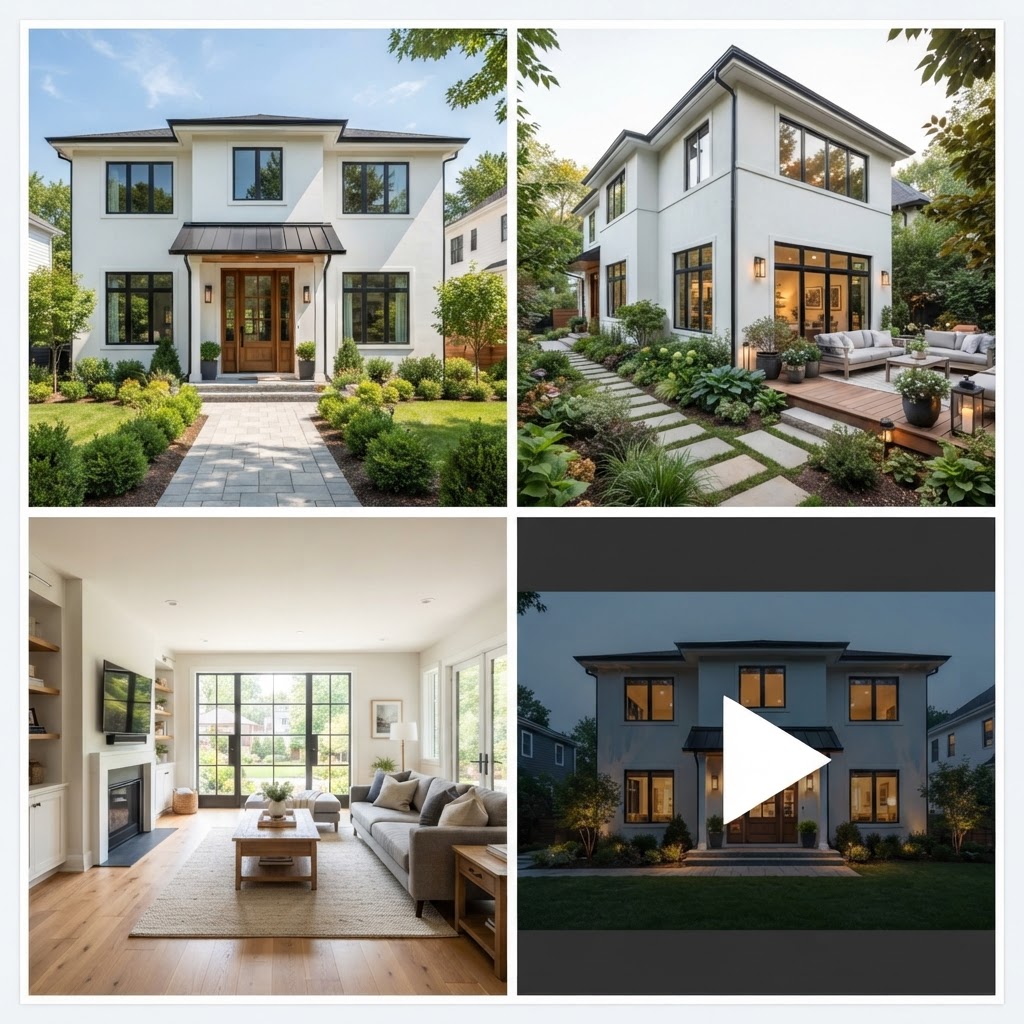
Useful output falls into four groups: exterior concepts (massing, roof, windows, cladding), interior images of key rooms, a dimensioned draft floor plan, and a 3D model you can walk through. On ArchHomeAI these live in one project across the AI Studio, the 2D plan editor and the 3D planner. Structure, drainage, energy and local codes stay invisible to the model, so treat each render as a picture of an intention. For the wider do-it-yourself route, see designing your own house online.
How to write a house design brief that AI can work with
A good brief for AI house design fits on one page and covers plot, household, size, style and budget in plain sentences. The more measurable it is, the less the model invents. "Three bedrooms, about 180 m², one storey, south-facing garden" beats "a cosy modern family home" every time.
Size is where briefs go wrong most often. The US Census Bureau's 2025 highlights put the median new single-family home completed in 2025 at 2,142 sq ft (about 199 m²). NAHB's 2024 What Home Buyers Really Want study found buyers' median desired size was 2,067 sq ft, against 2,200 sq ft for new homes started in 2023. People tend to want slightly less house than gets built, and the brief is the cheapest place to hold that line.
- Plot: dimensions, where north is, slope, access, trees and views worth keeping.
- Household: who lives there now and in ten years; bedrooms, bathrooms, office, guest room.
- Size and floors: a target area and one or two storeys.
- Style: two or three reference words, such as "modern farmhouse, dark standing-seam roof".
- Deal-breakers and budget band: a ground-floor bedroom, covered parking, a rough cost ceiling.
Give special rooms a size. In the same study, 66% of buyers wanted exactly one home office, and 59% of those wanted it 100 to 150 sq ft (about 9 to 14 m²), per NAHB's home office analysis. Write "office" without a size and you'll get anything from a nook to a library.
AI exterior house design: style, roof and windows
The exterior is where AI is strongest: it can show five convincing versions of a house in the time it takes to describe one. Use that to settle three things in order: roof form, the ratio of wall to glass, then the cladding mix. Once those are fixed, the rest of the facade is detail.

Start broad, with the same plot photo in two or three styles, say a flat-roofed modern box, a gabled farmhouse and a hipped Mediterranean villa. On ArchHomeAI each variation costs 2 credits with Nano Banana 2 or Flux 2, and the free Enhance prompt button expands a short description. Then lock the style and vary one thing per round; changing roof, cladding and windows together teaches you nothing.
Watch the glass. Image models love floor-to-ceiling windows because they photograph well, but glazing costs money and heat. NAHB reports 83% of buyers rated ENERGY STAR windows essential or desirable, the third most wanted of 200-plus features, in its 2024 window and door analysis. Our modern house design guide covers glazing and flat roofs in depth.
See three exterior styles for your plot Upload a photo of your plot or existing house, describe the style and compare variations side by side. A standard render costs 2 credits; new accounts start with 5 free. Try it on your plot photo: 5 free credits
Choosing exterior materials with AI renders
AI renders are a good way to compare material palettes and a poor way to approve a specific product. Use them to choose between families, such as render versus brick or timber versus fiber cement, then confirm colour and texture with physical samples outdoors. Screens shift colour, and models smooth out joints, fixings and weathering.
Common materials come with installers, warranties and predictable prices, so it helps to know what builders use. According to NAHB's 2026 exterior material analysis of Census data, vinyl siding led on US homes started in 2025, ahead of stucco, fiber cement and brick. Regional habits are strong: stucco took 65% in the Pacific division and brick 54% in the West South Central.
- Vinyl siding: 27.7%
- Stucco: 24.1%
- Fiber cement: 22.6%
- Brick or brick veneer: 16.8%
- Wood or wood products: 5.9%
Source: NAHB Eye on Housing (July 2026), Census Survey of Construction data. All other materials under 2% each.

A practical rule: two main cladding materials plus one accent. AI will happily stack stone, timber, render and metal on one facade; it looks rich on screen and busy, expensive and leak-prone on site. For colour, our guide to exterior house colors explains light reflectance value and sample testing.
AI house layout: turning a concept into a draft floor plan
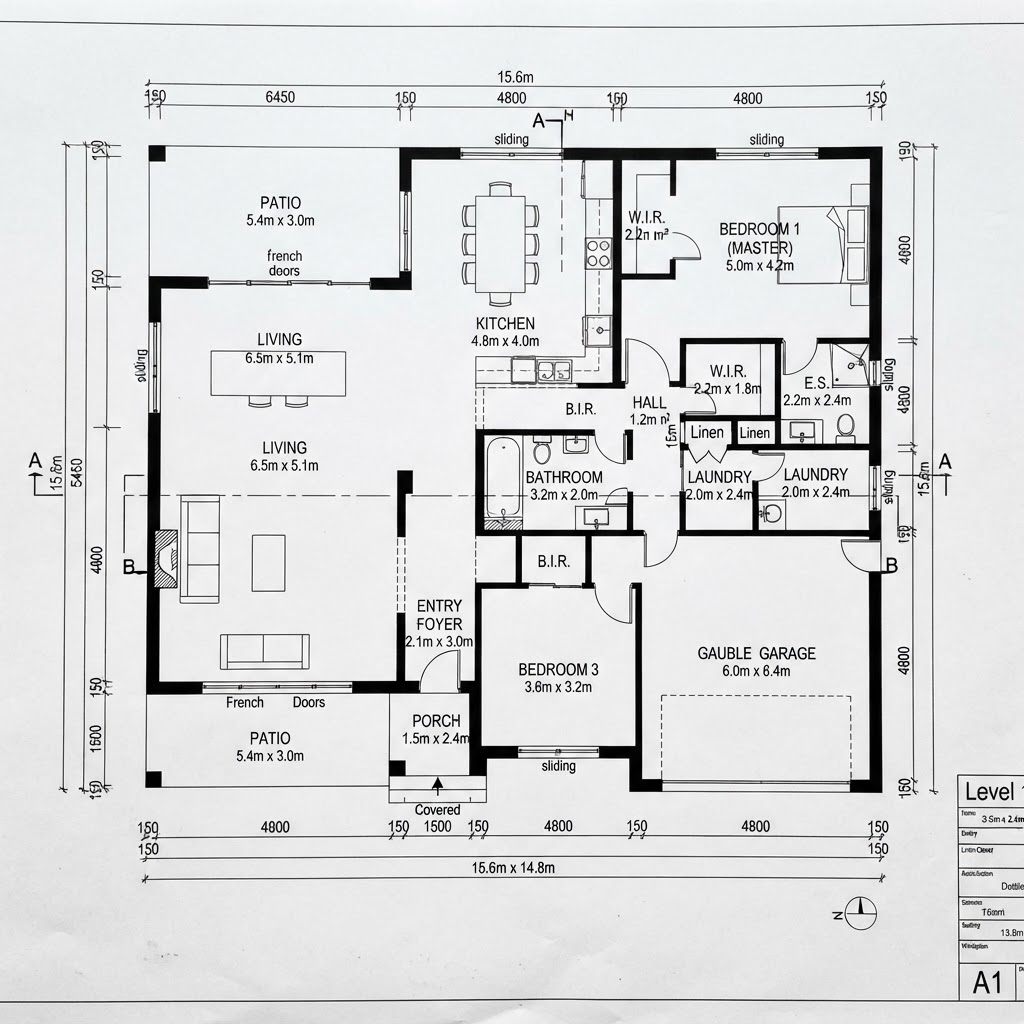
A good exterior means little until the rooms fit behind it, so the next step is a draft floor plan. AI can produce one from a written brief in a minute or two. Your job is to check it like a sceptical builder and fix proportions, circulation and stairs by hand.
In ArchHomeAI's 2D plan editor, an AI plan from a brief costs 1 credit per floor; importing a plan image with AI reading costs 3 credits. You get an editable CAD-style drawing with walls, doors, windows, furniture and dimensions, plus roofs, elevations, sections, quantities and side-by-side design options, exportable as DXF, SVG, PDF or IFC. Our AI floor plan generator guide covers briefing and checking in detail.

- Circulation: can you reach the kitchen from the front door without crossing the living room?
- Wet rooms: are bathrooms and kitchen grouped, and stacked between floors?
- Stairs: realistic footprint and headroom, or did the AI draw a ladder?
- Orientation: do living spaces face sun and garden rather than the street?
Plan the outdoor room from day one, because it fixes where the living area goes. NAHB reports only 17.4% of new homes built in 2024 had a deck, against more than 60% with a patio, yet 79% of buyers rated a deck essential or desirable (NAHB, 2025).
From brief to concept with AI: a step-by-step workflow
The workflow that wastes least runs from outside in: brief, exterior direction, materials, plan, then 3D. Each stage narrows the next, so you never pay to render a facade for a plan you've already rejected. Here's how it looks on ArchHomeAI, with credits per step.
- Write the brief Paste your one-page brief into the prompt box and use Enhance prompt (free) to expand it.
- Generate exterior directions Upload the plot or house photo and run two or three styles at 2 credits per image (5 with Nano Banana Pro).
- Refine one variable at a time Studio Pro edits (area edit, material swap, sky, season, time of day) cost 4 credits each; a style reference image is free.
- Draft the floor plan Generate a plan from the brief in the 2D editor, then correct walls, stairs and room sizes.
- Check it in 3D Turn the plan into a 3D model (3 credits), walk through it, and make a photoreal 3D render (4 credits) of the key view.
- Share and hand over Send a share page for comments and approval, then pass DXF or IFC files to your architect.
| Stage | What you make | Credits |
|---|---|---|
| Exterior options | 10 render variations (Nano Banana 2 or Flux 2) | 20 |
| Refinement | 4 Studio Pro edits | 16 |
| Floor plan | AI plan from brief, 2 floors | 2 |
| 3D | Plan to 3D model + 2 photoreal 3D renders | 11 |
| Total | One concept round | 49 |
At 49 credits the round fits inside the one-time 100-credit pack at $11, and failed generations are refunded automatically; see the credits page. Leave 5 or 10 second videos (17 to 49 credits) and 4K upscales for the version you'll actually present.
AI house design vs hiring an architect: costs and roles
AI and an architect do different jobs, so the honest comparison is about sequence, not substitution. AI is cheap and fast for exploring; the architect makes the house buildable, compliant and accountable. Use AI first and you arrive at the first meeting with decisions instead of a wish list.
HomeGuide's cost guide (updated December 2025) puts architect fees at 5% to 20% of construction cost for residential projects, $100 to $250 an hour, $15,000 to $80,000 or more for full-service new-home plans, and $500 to $5,000 for stock plans. These are US figures; fees vary by country.
- 5–20% of construction cost: typical residential architect fee (HomeGuide, 2025)
- $15,000–$80,000+ full-service architect plans for a new home (HomeGuide, 2025)
- 59% of UK architecture practices used AI in 2025, up from 41% (RIBA)
- ≈ $0.17–0.22 one standard AI render on ArchHomeAI (2 credits)
| Task | AI tools | Architect / engineer |
|---|---|---|
| Styles and massing | Dozens of options in an hour | Slower, grounded in site and code |
| Materials and colour | Compares families | Specifies products and details |
| Floor plan | Fast first draft | Develops and resolves it |
| Structure, energy, drainage | Not covered | Designs and takes responsibility |
| Permit and construction drawings | Not suitable | Required in most jurisdictions |
Architects use AI too: the RIBA AI Report 2025 found 59% of UK practices did in 2025. Bringing AI concepts to a meeting is normal now; just label them as concepts. For the build budget itself, see what it costs to build a house.
Where AI house design fails, and when not to use it
AI house design fails wherever the answer depends on facts it can't see: soil, slope, structure, codes and real costs. It also struggles with consistency, so the same house may grow a window or change roof pitch between views. Fix the plan and 3D model first, then render from them.
- Impossible structure: long cantilevers and frameless corner glass look effortless and cost a fortune in steel.
- Site blindness: setbacks, height limits, easements, flood zones and drainage aren't in the photo.
- Cost blindness: a stone villa renders as cheaply as a timber cabin.
In the same RIBA survey, 44% of architects worried AI would let unqualified people design buildings. Take that as fair warning: a polished image can hide a poor plan. Skip AI altogether if you're choosing from a builder's standard range, or if a steep, heritage or tiny infill plot means planning rules will dictate the form; pay for a feasibility study instead.
Our recommendation for designing a house with AI
Use AI for the first two to four weeks of thinking, then hire help. Aim to leave that phase with a one-page brief, one chosen exterior, a material palette, a draft plan you've walked through in 3D, and a list of questions. That package makes an architect's first hour far more valuable than a folder of saved photos.
For most people, a few dollars of credits and a weekend of iterations is the cheapest design insurance there is. Once you have a direction, check it at human scale in the 3D planner; our guide to 3D home visualization shows how.
Turn your brief into a draft plan and 3D model Generate a floor plan from your written brief at 1 credit per floor, edit it in a CAD-style editor and send it to 3D. New accounts get 5 free credits, no card needed. Draw a plan from your brief
Frequently asked questions
Can AI design a whole house?
AI can design the concept of a whole house: exterior options, interior images, a material palette, a draft floor plan and a 3D model. It can't produce a buildable design, because it doesn't check structure, drainage, energy rules, setbacks or local codes. Treat the output as a well-prepared brief that a licensed architect or engineer develops into permit and construction drawings.
Is there a free AI house design tool?
Several tools offer free tiers or trials with limited images. On ArchHomeAI, new accounts get 5 free credits with no card, enough for two standard renders, or a one-floor plan from a brief plus a render. A full concept round of about 50 credits fits inside the 100-credit pack at $11.
How do I describe my house to an AI design tool?
Write measurable facts, not moods: plot size and orientation, floors, target area, rooms with rough sizes, two or three style words and deal-breakers. For example: "single storey, 180 m², three bedrooms, 12 m² office, gabled roof, white render and timber, living room facing the south garden." Then change one thing per round.
Can AI make a house floor plan from a description?
Yes. AI floor plan tools draft rooms, walls, doors, windows and dimensions from a written brief in a minute or two; on ArchHomeAI it costs 1 credit per floor. Expect to correct circulation, stairs and room proportions by hand. The plan is an early-design draft, not a permit drawing.
Is AI house design cheaper than an architect?
For concepts, by far: a standard AI render costs roughly $0.17 to $0.22 on ArchHomeAI, while US residential architect fees typically run 5% to 20% of construction cost (HomeGuide, 2025). They aren't substitutes, though. AI helps you decide what you want; an architect makes it legal and buildable, and most jurisdictions require one for permits.
Sources
How we wrote this guide: every figure comes from the sources listed at the end and was checked in September 2026. Prices vary by city, specification and year.
- 2025 New Single-Family Home Highlights — US Census Bureau
- Home Sizes: Demand versus Supply — NAHB Eye on Housing
- Most Home Buyers Want One, Medium-Sized Home Office — NAHB Eye on Housing
- Home Buyers Preferences for Window and Door Features — NAHB Eye on Housing
- Exterior Material Trends in Single-Family Homes — NAHB Eye on Housing
- Share of New Homes with Decks Edges Lower — NAHB Eye on Housing
- How Much Does an Architect Cost? — HomeGuide
- Second RIBA AI Report shows surge in usage among UK architects — Royal Institute of British Architects