

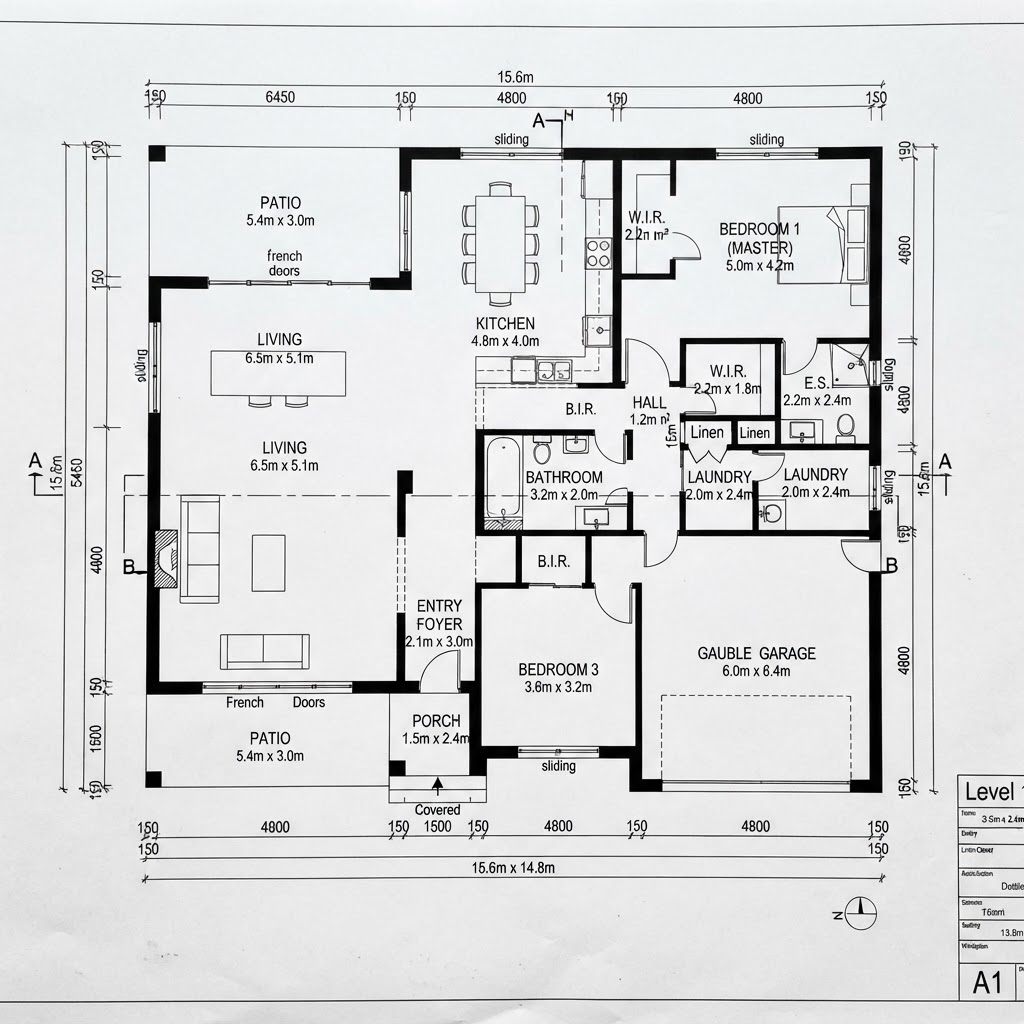
A 2D house plan is a scaled, top-down drawing of each floor showing walls, doors, windows, rooms and dimensions, usually backed by elevations and sections. You can draw one online for free or for a few dollars, export it as PDF, DXF or IFC, and use it to agree a layout before paying an architect for permit drawings.
Key takeaways
- A useful 2D plan set is more than a floor plan: it includes a roof plan, elevations, sections and a room area schedule.
- Floor plans are normally drawn at 1:100 or 1:50, so a 12 m wall is 12 cm long on paper at 1:100 (First In Architecture).
- In NAR's 2025 Profile of Home Buyers and Sellers, 57% of buyers who searched online rated floor plans very useful, against 38% for virtual tours.
- 2D plan tools range from free (Sweet Home 3D, open source) to $399 a year for SketchUp Pro with LayOut, as listed in October 2026.
- Online and AI-drafted plans are early-design drafts; permit and construction drawings need a licensed architect or engineer.
What is a 2D house plan, and what should a complete one include?
A 2D house plan is a flat, scaled drawing seen from above, as if the building were cut horizontally partway up the walls, so you see walls, openings and furniture. A complete set also includes views from the side (elevations) and slices through the building (sections). One floor plan answers how rooms connect, but not how high, how steep or how big.
- Floor plan per level: walls with thickness, doors with swing, windows, stairs, room names and areas, dimensions.
- Roof plan: ridges, slopes, gutters and overhangs.
- Elevations: each facade, showing window heights, roof pitch and materials.
- Sections: at least one cut through the stairs, showing floor-to-ceiling heights.
- Site plan: the house on the plot with boundaries, setbacks, parking and garden.
- Schedules and quantities: room areas, door and window lists, wall and floor quantities.
How to make a 2D house plan online, step by step
Work from the outside in: plot and outer walls first, then interior walls, then openings, then everything else. Dimensions and room areas should be live from the start, so you notice a 2.4 m bedroom before it gets furnished. Here is the order that saves the most rework in an online editor.
- Set units and the plot Pick metres or feet and draw the plot boundary with setbacks as a no-build zone. Everything after this is checked against it.
- Draw the outer walls Use real wall thicknesses from your construction type, not single lines. Thin walls on a draft make every room look bigger than it will be.
- Split the interior Add internal walls and name each room so its area is calculated. Check areas against your brief now, not after furnishing.
- Place doors, windows and stairs Show door swings so you see clashes. Stairs need their full run on both floors, which is where many first drafts fail.
- Furnish to test, then dimension Drop in a bed, a dining table and a sofa at real sizes. Then add chain dimensions along each wall.
- Add roof, elevations and sections Generate the roof, then check elevations for window heights and a section for ceiling heights.
- Export the set Print a PDF at true scale for discussions, and export DXF or IFC for the professional who takes it further.
In our 2D plan editor you can do all of this with the mouse or with typed AutoCAD-style commands, and roofs, elevations, sections and quantities come from the same model. For drawing conventions (symbols, line weights, wall thicknesses), see our guide on how to draw a floor plan.
Draw, import or generate: three ways to start a 2D plan
You can start from a blank sheet, from an existing plan, or from a written brief that an AI turns into a first layout. The right choice depends on whether a building already exists and how clear your brief is. Most projects end up mixing two of them.
| Start from | Best for | Effort | Credits | Caution |
|---|---|---|---|---|
| Blank sheet | New builds with a clear idea, or learning the layout yourself | Highest | Your time | Slow until you know the commands |
| Existing plan image | Renovations where an old plan or sale brochure exists | Low | AI plan reading: 3 credits | Old plans are often out of date; verify on site |
| DXF file | Plans from an architect, surveyor or CAD tool | Lowest | Direct import | Check layers and units after import |
| Written brief | Exploring layouts for a new house quickly | Low | 1 credit per floor | A draft to edit, never a final plan |
Generating from a brief is the fastest way to see five different arrangements of the same rooms, and it is cheap at 1 credit per floor. It still needs a human to fix circulation and room proportions. Our AI floor plan generator guide explains how to write the brief and what to check in the result.

Which scale and sheet size should a 2D house plan use?
Use 1:100 for whole-floor plans of a typical house and 1:50 when you need to show kitchens, bathrooms or furniture clearly. Site plans usually go to 1:200 or 1:500. The sheet size then follows from the scale and the size of the house.
According to First In Architecture's guide to scales, floor plans, elevations and sections are normally drawn at 1:100 or 1:50, room plans at 1:50 or 1:20, and site plans at 1:200 or 1:100. At 1:100, 1 cm on paper is 1 m in reality, so a 12 × 9 m house occupies 12 × 9 cm. At 1:50 the same house needs 24 × 18 cm plus room for dimensions and a title block.
Worked example: the median new single-family home completed in the US in 2025 was 2,142 sq ft, about 199 m², according to the Census Bureau's Characteristics of New Housing. Split over two floors, each level is roughly 100 m², say 10 × 10 m, which is a 10 × 10 cm drawing at 1:100. At 1:50 it doubles to 20 × 20 cm before dimensions and a title block, so plan for a bigger sheet. Our editor prints drawing sets at true scale from A4 to A1, at 1:50 or 1:100.

Planning a renovation: existing, demolish and new
A renovation plan shows three states on one drawing: what exists, what is removed and what is added. Builders, engineers and planning offices all expect this convention, and it is the quickest way to see the true scope of work. Without it, a renovation plan is just a pretty new layout.
Measure the existing house and draw it as "existing". Mark walls to remove as "demolish", usually dashed, and new walls as "new", usually hatched. The ArchHomeAI editor supports these phases plus design options, so "open kitchen" and "kitchen with pantry" can sit side by side with their quantities. Any wall marked for demolition needs an engineer's check first; a drawing can't tell you which walls carry load.
Draw your plan in the browser Walls, doors, windows, dimensions, roofs, elevations and sections in one editor, with PDF, DXF and IFC export. Or describe your house and get a first layout for 1 credit per floor. Open the 2D plan editor
2D plan file formats: PDF, SVG, DXF or IFC?
Export PDF for people, DXF for CAD users and IFC for BIM software. SVG is handy for web pages and presentations. The format matters because it decides whether the next person can keep working on your plan or has to redraw it.
| Format | What it keeps | Send it to | Limitation |
|---|---|---|---|
| PDF at true scale | The drawing exactly as printed | Clients, family, builders for discussion | Not editable as geometry |
| SVG | Vector lines and text | Websites, presentations, graphic designers | No building information |
| DXF | Lines, layers and dimensions | Architects and drafters using CAD | Walls are lines, not objects |
| IFC | Walls, doors, windows and spaces as objects | Architects and engineers using BIM tools | Quality depends on how the model was built |
IFC is the open standard maintained by buildingSMART International and published as ISO 16739, with the latest edition ISO 16739-1:2024 for IFC 4.3. If your architect works in a BIM tool, an IFC export can save them retyping walls and rooms. If they work in 2D CAD, DXF is the safer handover.
Free and paid 2D house plan tools compared
You can draw a decent 2D house plan for free; you pay for measurements, true-scale printing, professional exports and libraries. The prices below are the list prices on each vendor's own page in October 2026. Check before buying, since plans change often.
| Tool | Price | Strengths | Weak spot for house plans |
|---|---|---|---|
| Sweet Home 3D | Free, open source (GPL) | Desktop and browser; plan plus instant 3D view | Limited drawing-set output |
| Floorplanner | Free plan; paid tiers and credits | Fast in the browser | Free exports are SD (960 × 540 px) with watermark |
| RoomSketcher | Free; Pro $144/year | Clear 2D and 3D plans for listings | Free plan has no measurements or area totals |
| SketchUp | Go $129/year; Pro $399/year | Pro includes LayOut for 2D documentation | A 3D modeller first; plans take setup |
| ArchHomeAI 2D editor | Credits; 5 free on sign-up | CAD-style commands, elevations, sections, quantities, DXF and IFC, AI plan from brief | Early-design drafts, not permit drawings |
- Sweet Home 3D: Free
- Planner 5D Premium: $59.99
- SketchUp Go: $129
- RoomSketcher Pro: $144
- SketchUp Pro (with LayOut): $399
Sources: vendor pricing pages for Sweet Home 3D, Planner 5D, SketchUp and RoomSketcher, checked October 2026.
Our honest view: for a single floor layout to show a builder, Sweet Home 3D costs nothing and does the job. RoomSketcher is strong for real-estate plans, and SketchUp Pro suits people who already model in 3D. When the plan must travel to a professional, pick an editor with elevations, sections and DXF/IFC export.
When is a 2D house plan enough, and when do you need 3D?
A 2D plan is enough to agree layout, room sizes and circulation, and it is what professionals price and permit from. You need 3D when people struggle to read plans, when heights and volumes matter, or when you are choosing materials. Most families understand a house only once they see it.
The buyer data backs plans more than people expect. In NAR's 2025 Profile of Home Buyers and Sellers, 57% of buyers who searched online rated floor plans very useful, compared with 38% for virtual tours and 29% for videos. Plans are where decisions get made; 3D is where they get felt. When you reach that point, send the plan to the 3D planner, where 2D and 3D stay in sync, or render a quick exterior in the AI Studio. Our 3D home design guide covers that stage.
- 57% of online home buyers rate floor plans very useful (NAR, 2025)
- 38% rate virtual tours very useful (NAR, 2025)
- 2,142 sq ft median size of new US single-family homes completed in 2025 (Census)
- 1:100 the usual scale for whole-floor house plans
What an online 2D plan can't do for you
An online plan, AI-assisted or drawn by hand, cannot get you a permit, prove a structure works or confirm code compliance. Those need a licensed architect or engineer who knows your local rules. Its job is to make that professional's work faster and your brief clearer.

Start with a plan you can hand over Draw it yourself, import an old plan, or generate a first layout from a brief. Export a true-scale PDF for the family and DXF or IFC for your architect. Draw my house plan, 5 free credits
Frequently asked questions
How do I make a 2D house plan online for free?
Use a free tool such as Sweet Home 3D, Floorplanner's free plan or RoomSketcher's free tier, or the ArchHomeAI editor with 5 free sign-up credits. Draw the plot and outer walls first, then interior walls, doors, windows and stairs, then dimensions. Free tiers often limit exports or measurements, so check what you can print before investing hours.
What is the difference between a 2D and a 3D floor plan?
A 2D floor plan is a flat, scaled top-down drawing with exact dimensions, used to agree layouts and to price and permit work. A 3D floor plan shows the same layout as a model with furniture and materials, which is easier for non-professionals to read. Start with 2D for accuracy, then add 3D to check how spaces feel.
What scale should a house floor plan be?
Whole-floor house plans are usually drawn at 1:100, and at 1:50 when kitchens, bathrooms or furniture need to be readable. Site plans use 1:200 or smaller, and room details 1:20. Always include a scale bar on the sheet, because PDFs are often printed resized with "fit to page", which silently breaks the stated scale while a scale bar still measures correctly.
Can I get a building permit with a plan I drew online?
Usually not on its own. Most jurisdictions require permit drawings prepared or stamped by a licensed architect or engineer, with structural, energy and code details an online plan does not contain. Your plan is still valuable: it fixes the layout and room sizes, so the professional starts from a clear brief instead of a blank page.
Which file format should I send my architect?
Ask first. Architects working in 2D CAD usually want DXF, which keeps lines, layers and dimensions. Those working in BIM tools such as Revit or Archicad can use IFC, the ISO 16739 open standard, which keeps walls, doors and rooms as objects. Send a true-scale PDF as well so everyone sees the same drawing.
Can AI draw a 2D house plan from a description?
Yes, as a first draft. You describe the plot, number of floors, bedrooms, bathrooms and priorities, and the AI proposes a layout, at 1 credit per floor in our editor. Expect to fix corridor widths, stair runs and room proportions. Treat the result as one option among several, then refine it by hand.
Sources
How we wrote this guide: every figure comes from the sources listed at the end and was checked in September 2026. Prices vary by city, specification and year.
- 2025 Profile of Home Buyers and Sellers — National Association of REALTORS
- Characteristics of New Housing: Highlights — U.S. Census Bureau
- Understanding Scales and Scale Drawings — First In Architecture
- Industry Foundation Classes (IFC) — buildingSMART International
- Sweet Home 3D — Sweet Home 3D
- RoomSketcher Pricing — RoomSketcher
- SketchUp plans and pricing — Trimble
- Floorplanner pricing — Floorplanner
- Planner 5D pricing — Planner 5D