

AI house visualization uses image-generation models to turn a photo of a plot, an existing house, a sketch or a floor plan into photorealistic images of a proposed design. A batch of variations takes minutes and costs well under a dollar per image, but the results are approximate pictures, not measured drawings you can build from.
Key takeaways
- 58% of US renovating homeowners who use AI do so to visualize design concepts, according to Houzz's September 2026 survey of 3,149 homeowners.
- A freelance residential exterior render costs about $200 to $700 per image (Cad Crowd, 2024 update), while a standard AI render variation costs roughly $0.17 to $0.22.
- AI images can drift on geometry between variations: window counts, roof pitches and proportions are suggestions, not dimensions.
- Use AI visualization to choose a direction, then move the chosen option into a 2D plan or 3D model before anyone prices or permits it.
What is AI house visualization?
AI house visualization is the use of generative image models to show what a house could look like before it is built or renovated. You give it a starting image and a description, and it returns photorealistic options. It replaces the slow modelling step of a classic render, not the design thinking.
The difference from traditional rendering is the input. A 3D artist needs an accurate model, materials and camera positions first. An AI tool works from a phone photo, a scanned sketch or a floor plan, and fills the gaps by predicting what a plausible house with your description looks like. Our architectural rendering guide covers the traditional side.
- Empty plot photo: you get a new house placed on the land, at eye level.
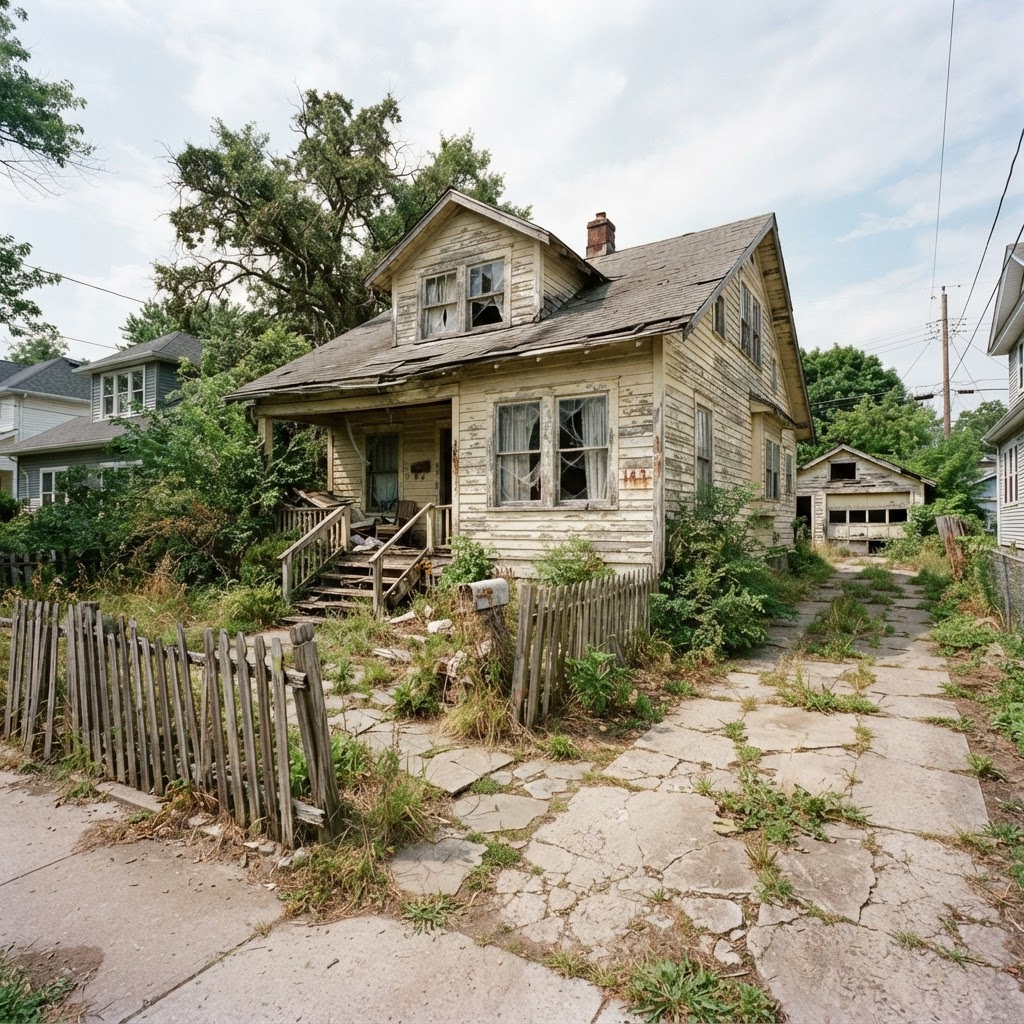
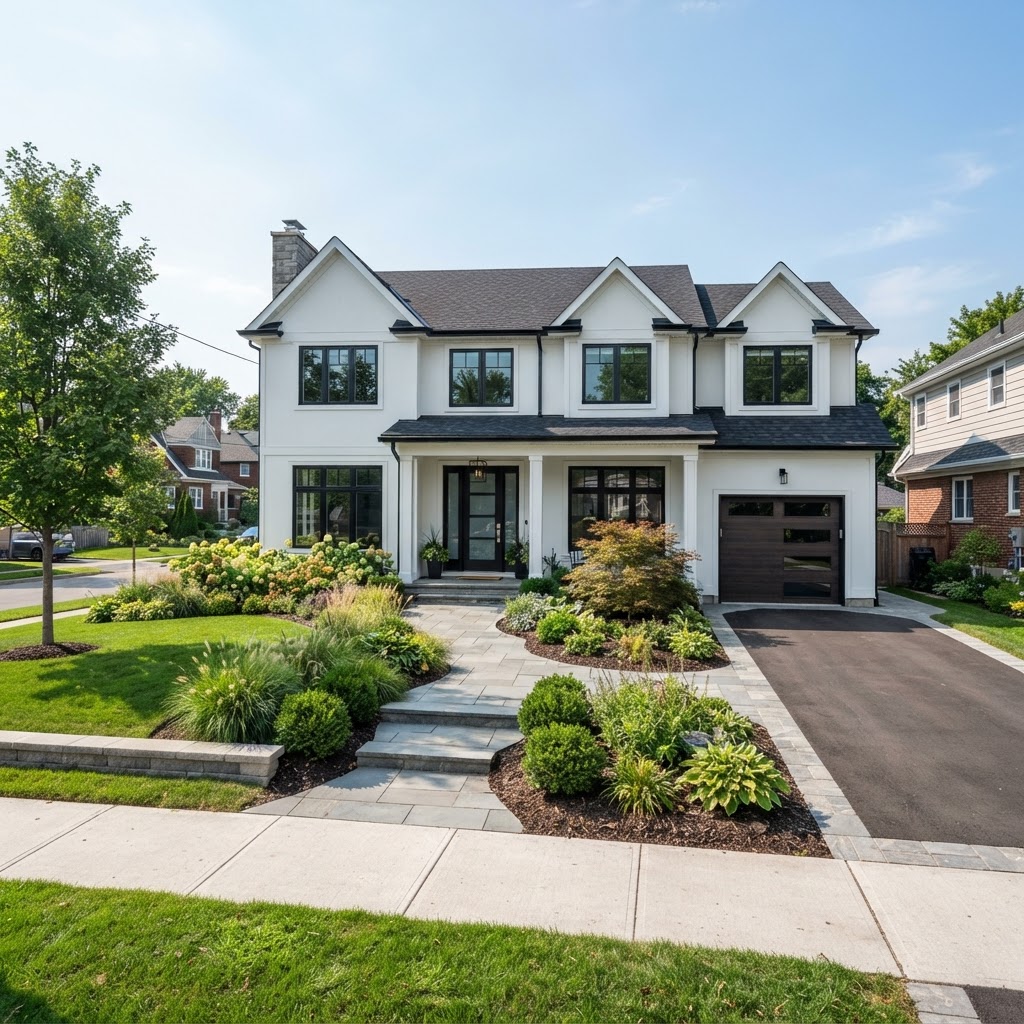
- Existing house photo: you get the same building with a new facade, roof, colours, windows or landscaping.
- Room photo or empty shell: you get furnished, finished interiors.
- Sketch or floor plan: you get a first exterior or interior impression of a design that only exists on paper.
How does AI home visualization work?
Modern image models read your photo and your text together, then generate a new image that keeps the parts you asked to keep and changes the rest. They do not build a 3D model or calculate light physically. They predict pixels that look right, which is both their strength and their weakness.
Google's announcement of Gemini 2.5 Flash Image, the model nicknamed nano-banana, says it can merge several input images and "restyle a room with a color scheme or texture" from one prompt. The same post admits the team is still improving "factual representation like fine details in images", which is the honest summary of the whole category. Google's launch post also notes that its images carry an invisible SynthID watermark.

Three things decide the quality of what comes back. The starting photo matters most: a straight-on, evenly lit facade with the whole building in frame gives the model a clear structure to respect. Next is the description, where materials beat adjectives ("white render, dark bronze frames, standing-seam roof" works; "stunning modern" does not). Last is the model, since some follow instructions more literally and others produce nicer light.
What the numbers say about AI visualization in home design
Visualization is the main reason homeowners touch AI at all, and professionals are adopting it fast. The caution is real too: accuracy is the top worry on both sides. Here are the figures worth knowing in 2026.
- 58% of US homeowners using AI for a renovation use it to visualize design concepts (Houzz, 2026)
- 68% of AI-using US design firms apply it to planning and design, double the year before (Houzz, 2026)
- 59% of UK architecture practices used AI in 2025, up from 41% in 2024 (RIBA)
- 37% of US home professionals worry about AI reliability and accuracy (Houzz, 2026)
The Houzz figures come from its September 2026 report on AI in home design, based on 601 businesses and 3,149 renovating homeowners, of whom only 22% had used AI so far. The RIBA AI Report 2025 adds a warning: 67% of UK architects fear AI raises the risk of their work being imitated.
What can you visualize with AI, and what should you upload?
Almost any residential question that is about appearance can be answered with an AI image: a new house on a plot, a renovated facade, a finished interior, a garden or pool. What you upload decides how faithful the result is. Start from a real photo whenever one exists.
| Project | Best starting input | What you get | Watch out for |
|---|---|---|---|
| New build on an empty plot | Eye-level photo of the plot from the street | A proposed house placed in its real setting | Scale against neighbours and slope is guessed |
| Exterior renovation | Straight-on photo of the whole facade | Same house with new cladding, colours, roof or windows | Window positions can shift unless you ask to keep them |
| Interior redesign | Room photo shot from a corner at 1.2–1.5 m height | Furnished, finished room options | Furniture sizes are not checked against the room |
| Garden, pool, fencing | Photo of the yard including the house edge | Landscaping and outdoor features in context | Plants are shown mature, not as planted |
| Design on paper only | Floor plan or sketch | A first impression of the massing and style | Lowest fidelity; treat as mood, not design |
Say you have a 15 × 30 m plot and want a two-storey house with a flat roof. A plot photo plus a description of massing, cladding and glazing gets you several believable options in one run. It won't check setbacks; our guide to designing your own house online covers those.
How much does AI house visualization cost compared with a 3D artist?
An AI render costs cents to a few dollars per image; a human-made residential render costs hundreds. That gap is the whole business case. It doesn't mean the two products are equal, because the 3D artist's price buys geometric accuracy and controlled revisions.
According to Cad Crowd's pricing guide (updated November 2024), freelancers and small firms charge $200 to $700 for a residential exterior and $200 to $550 for an interior. VizCloud's 2026 guide puts marketing-grade exteriors at $500 to $1,500 each, studio virtual staging at $1,200 to $1,800 per room, and a single still at three to seven business days.
- AI render, standard model: $0.17–$0.22
- Freelancer, low end: $200
- Freelancer, high end: $700
- Marketing studio, high end: $1,500
Sources: Cad Crowd (Nov 2024), VizCloud (May 2026), ArchHomeAI credit pricing (October 2026). Prices vary by country and complexity.
| Action | Credits | ≈ USD on the 100-credit pack ($11) | ≈ USD on the 500-credit pack ($42) |
|---|---|---|---|
| Render variation, Nano Banana 2 or Flux 2 | 2 | $0.22 | $0.17 |
| Render variation, Nano Banana Pro | 5 | $0.55 | $0.42 |
| Render variation, GPT Image | 7 (+1 at 2K) | $0.77 | $0.59 |
| Edit an area, material swap or quick edit | 4 | $0.44 | $0.34 |
| 4K upscale | 6 | $0.66 | $0.50 |
These figures are simple arithmetic from the listed packages (100 credits for $11, 500 for $42, 1,200 for $87; monthly plans from 250 credits at $19). New accounts get 5 free credits without a card, and failed generations are refunded automatically. Current rates are on the pricing page.
See your own house first Upload a photo of your plot or facade to the AI Studio, describe the design, and compare several variations side by side. New accounts start with 5 free credits. Try it on your photo, 5 free credits
How to create an AI house visualization you can actually use
Treat the process as a funnel: wide and cheap at the start, narrow and deliberate at the end. Generate many options with a standard model, pick one direction, then spend credits on targeted edits rather than fresh rolls of the dice.
- Shoot the right photo Get the whole building or plot in frame, hold the phone level and avoid harsh midday shadows. Overcast light gives the cleanest surfaces.
- Write a material-first brief Name the roof form, cladding, frames, colours and landscaping, plus what must not change, such as the roofline. The free Enhance prompt button in the AI Studio expands a short note into a full prompt.
- Run a cheap first round Use a 2-credit model and generate several variations. You are choosing a direction, so skip 2K and premium models for now.
- Fix, don't regenerate Once one image is close, use edit-an-area or material swap (4 credits) to change only the cladding or only the windows. Rerolling the whole image tends to break what was already right.
- Finish for the audience Upscale to 4K for print, try a dusk version or a short video, and send it through a share page where a client can comment and approve.
Where AI house visualization fails
AI images fail wherever a number matters. Dimensions, structure, code compliance and exact product colours are outside what an image model knows. If a decision depends on any of those, the AI picture is a sketch, not evidence.
- Geometry drift: a window that is 1.2 m wide in one variation may be 1.6 m in the next, and the number of windows can change.
- Structure that cannot stand: cantilevers and glass corners look effortless in an image and cost serious money in steel.
- Scale and site: setbacks, height limits and slope are not checked. The house may simply not fit your zoning.
- Colour and material: on-screen tones differ from real paint, brick and timber.
- Text and signage: small text, house numbers and logos are still unreliable.

AI visualization vs 2D plan vs 3D model: which do you need?
You usually need all three, in that order. The AI image settles how the house should feel, the 2D plan settles what fits, and the 3D model checks how the spaces work together. Skipping the plan is the most common and most expensive mistake.
Once a direction is chosen, move it into the 2D plan editor, where walls, openings and dimensions are explicit, and from there into the 3D planner for a walk-through. Our guides to 2D house plans online and 3D home design online explain each step. Buyers care about this too: in NAR's 2025 Profile of Home Buyers and Sellers, 57% of buyers who searched online rated floor plans very useful, next to 81% for photos.

| Question | AI render | 2D plan | 3D model |
|---|---|---|---|
| What style and materials do we like? | Best | Weak | Good |
| Does the layout fit the plot and the brief? | No | Best | Good |
| How do rooms connect and feel in sequence? | Partly | Partly | Best |
| What will it cost to build? | No | Starting point for quantities | Starting point for quantities |
| Can we get a permit with it? | No | Only as drawings by a licensed professional | No |
Is AI house visualization worth it? Our recommendation
Yes, for the early, expensive-to-get-wrong decisions about style, materials and massing. Spending a few dollars to see ten facades before committing to one is about the best value in residential design today. It stops being worth it the moment you need precision.
Homeowners should use AI images to arrive at the first architect meeting with a clear picture of what they want, which shortens the most open-ended (and most billable) phase. Architects get the most from it in client alignment: three quick options in a meeting beat a week of modelling one. Real-estate marketers should be the most careful. NAR's 2025 staging research found 83% of buyers' agents say staging helps buyers picture a home as their own, so a photoreal render carries weight; label it as AI. See real results on the examples page.
From one photo to a full design direction Generate exterior and interior options in the AI Studio, then carry the chosen design into a 2D plan and a 3D model. Your first 5 credits are free. Create my first house render
Frequently asked questions
What is AI house visualization?
AI house visualization uses generative image models to show how a house could look before it is built or renovated. You upload a photo of a plot, an existing house, a room, a sketch or a plan, describe the design, and get photorealistic variations in minutes. The images are approximate design options, not measured drawings, so they suit early decisions about style and materials.
How accurate are AI house renders?
Accurate enough to judge style, colour direction and overall massing, not accurate enough for dimensions. Window sizes, roof pitches and proportions can change between variations, and on-screen colours differ from real materials. Even Google says its Gemini image model is still improving on fine details. Choose a direction with AI, then confirm it in a scaled 2D plan or 3D model.
How much does an AI house rendering cost?
On ArchHomeAI one standard variation costs 2 credits, about $0.17 to $0.22 depending on the credit package, and premium models cost 5 to 7 credits. For comparison, Cad Crowd's 2024-updated guide lists $200 to $700 for a freelance residential exterior, and VizCloud's 2026 guide lists $500 to $1,500 for marketing-grade exteriors. New ArchHomeAI accounts get 5 free credits.
Can AI visualize my house renovation from a photo?
Yes. A straight-on photo of the whole facade in soft light works best. Describe what should change, such as cladding, roof, windows or colours, and what must stay, such as the roofline. Generate several variations, then use targeted edits on the best one instead of regenerating. Structural changes still need a licensed architect or engineer before any work starts.
Can I use AI renders for a building permit?
No. Permit applications need scaled drawings, usually prepared or signed by a licensed architect or engineer depending on your jurisdiction. AI renders can support a conversation with neighbours or a planning officer as illustrations, but they carry no dimensions and may show details that differ from the real design. Treat them as mood images, and label them as AI-generated.
Sources
How we wrote this guide: every figure comes from the sources listed at the end and was checked in September 2026. Prices vary by city, specification and year.
- 12 Key Takeaways on AI in Home Design and Construction — Houzz
- Second RIBA AI Report shows surge in usage among UK architects — RIBA
- Introducing Gemini 2.5 Flash Image, our state-of-the-art image model — Google for Developers
- What are Architectural 3D Visualization Costs, Service Fees & Rates for Companies — Cad Crowd
- 3D Architectural Rendering Cost: Pricing Guide 2026 — VizCloud
- Profile of Home Staging (2025) — National Association of REALTORS
- 2025 Profile of Home Buyers and Sellers — National Association of REALTORS