

The most useful AI tools for architects in 2026 handle the fast, disposable work: concept renders from a site photo or sketch, quick plan drafts from a brief, mood variations and client presentations. They don't replace design judgment, coordination or permit drawings. Used early and checked carefully, they cut hours of visualization work per project.
Key takeaways
- RIBA's 2025 AI Report found AI use among UK architects rose from 41% to 59% in a single year.
- Houzz's 2026 survey of 601 US pros found 82% of AI-using design firms create pre-project visuals with it.
- A standard AI render on ArchHomeAI costs 2 credits, roughly $0.17 to $0.22, against $200 to $700 for a freelance residential exterior quoted by Cad Crowd.
- The US Copyright Office concluded in January 2025 that prompts alone don't make AI output copyrightable; human-determined expressive elements do.
- Keep AI in the early, reversible stages and hand off to BIM and licensed review before anything is built or submitted.
How are architects actually using AI in 2026?
Mostly for images, ideas and admin, not for the drawings that get built. Surveys on both sides of the Atlantic show adoption climbing fast, with visualization and early design at the top of the list and accuracy as the top worry.
The RIBA AI Report 2025 found that the share of UK architects using AI rose from 41% in 2024 to 59% in 2025. In the US, Houzz surveyed 601 construction and design professionals in June and July 2026: 39% of design firms use AI for business tasks, and of those, 68% apply it to planning and design and 82% to pre-project visuals.
The time savings are real but modest. Houzz puts the average at 3.6 hours a week for design firms, with 24% saving five hours or more. Meanwhile 37% of pros worry about reliability and accuracy, up from 33% a year earlier. That gap between enthusiasm and trust is exactly where a sensible workflow lives.
- 59% of UK architects use AI, up from 41% a year earlier (RIBA, 2025)
- 82% of AI-using US design firms create pre-project visuals with it (Houzz, 2026)
- 3.6 h average weekly time saved by design firms using AI (Houzz, 2026)
- 37% of pros worry about AI reliability and accuracy (Houzz, 2026)
Where AI fits in an architect's workflow, stage by stage
AI is strongest where output is cheap to throw away and weakest where output must be exact. Concept images, plan drafts and presentation material sit on the useful side; coordinated construction documents, structural decisions and code compliance sit firmly on the other.
A useful test: if a wrong answer costs you ten minutes, let AI try. If a wrong answer could cost a client a redesign, a rejected permit or a leak, keep it in your BIM model and your own checks.
| Stage | What AI does well | What stays with you |
|---|---|---|
| Brief and research | Summarizing client notes, drafting questionnaires, reading planning documents for a first pass | Interpreting local rules and the client's real priorities |
| Concept | Photoreal options from a site photo, sketch or massing model in minutes | Choosing a direction that works on the site |
| Early plans | Draft layouts from a written brief, plan image reading, quick area checks | Circulation, structure, daylight, code |
| Visualization | Material swaps, time of day, seasons, short videos | Checking every render against the actual design |
| Client review | Share pages, comments, version voting | Explaining trade-offs and costs |
| Permits and construction | Very little beyond admin | Coordinated drawings, stamps, site supervision |
AI concept renders from a site photo, sketch or massing model
This is the clearest win. You upload a photo of the plot or existing house, a hand sketch or a SketchUp screenshot, describe materials and mood, and get several photorealistic options in a minute or two instead of a day of modeling and lighting.
Input matters more than the prompt. A text-only prompt gives the model free rein over massing and proportions, so it will happily invent a third storey. A clean massing model or a line sketch pins the geometry down. In the ArchHomeAI Studio there is a sketch option that keeps lines, openings, proportions and the camera angle and only adds realism, at the same price as a normal render.

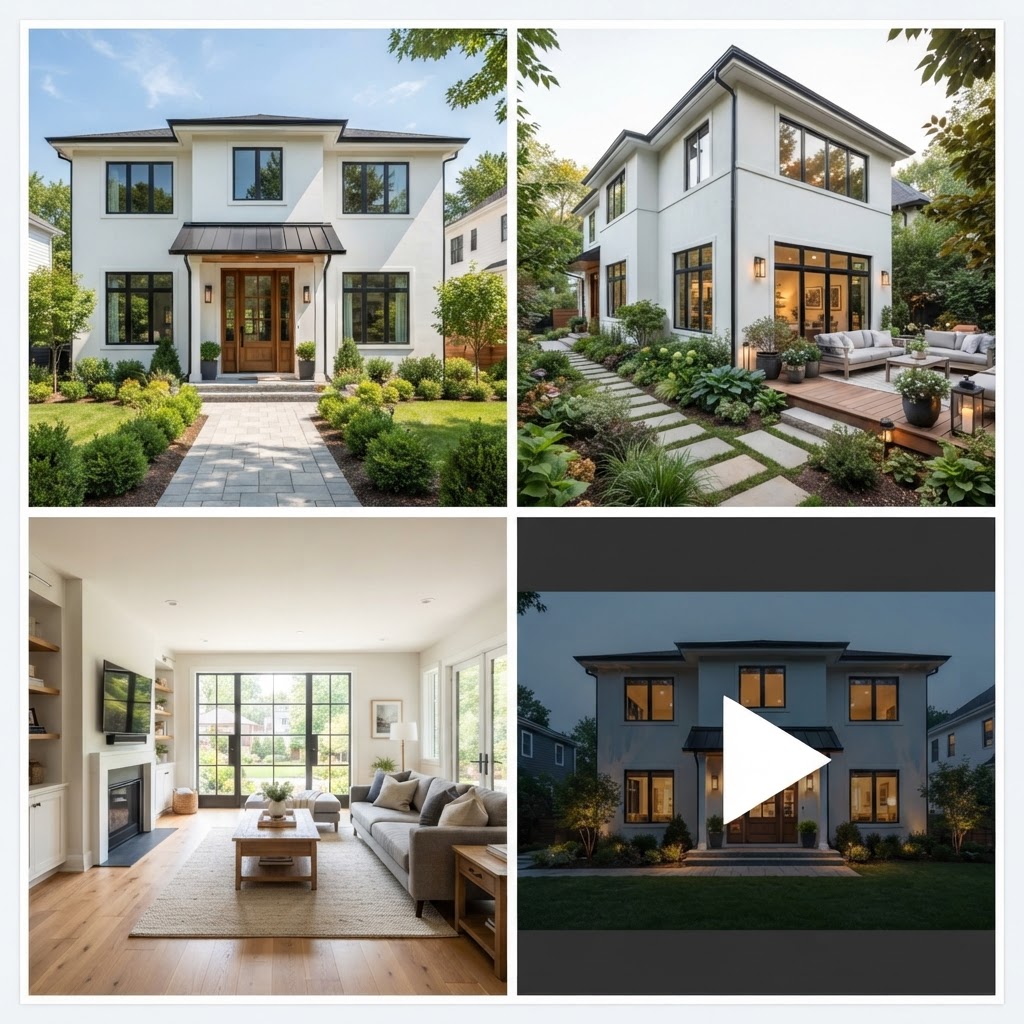
Two habits make concept renders far more useful. First, set a style reference image from your own portfolio so the output speaks your office's language; in the Studio it adds no extra credits, though it only works with the Nano Banana engines. Second, change one variable per round. Swap the cladding, then the roof, then the light, so you and the client can see what each move does. Our architectural rendering guide covers when a traditional renderer still beats this approach.
Can AI draw floor plans for architects?
It can draw useful first drafts, not drawings you would sign. AI plan tools are good at turning a brief into a starting layout and at reading a scanned plan into editable walls, and poor at structure, services and local code.
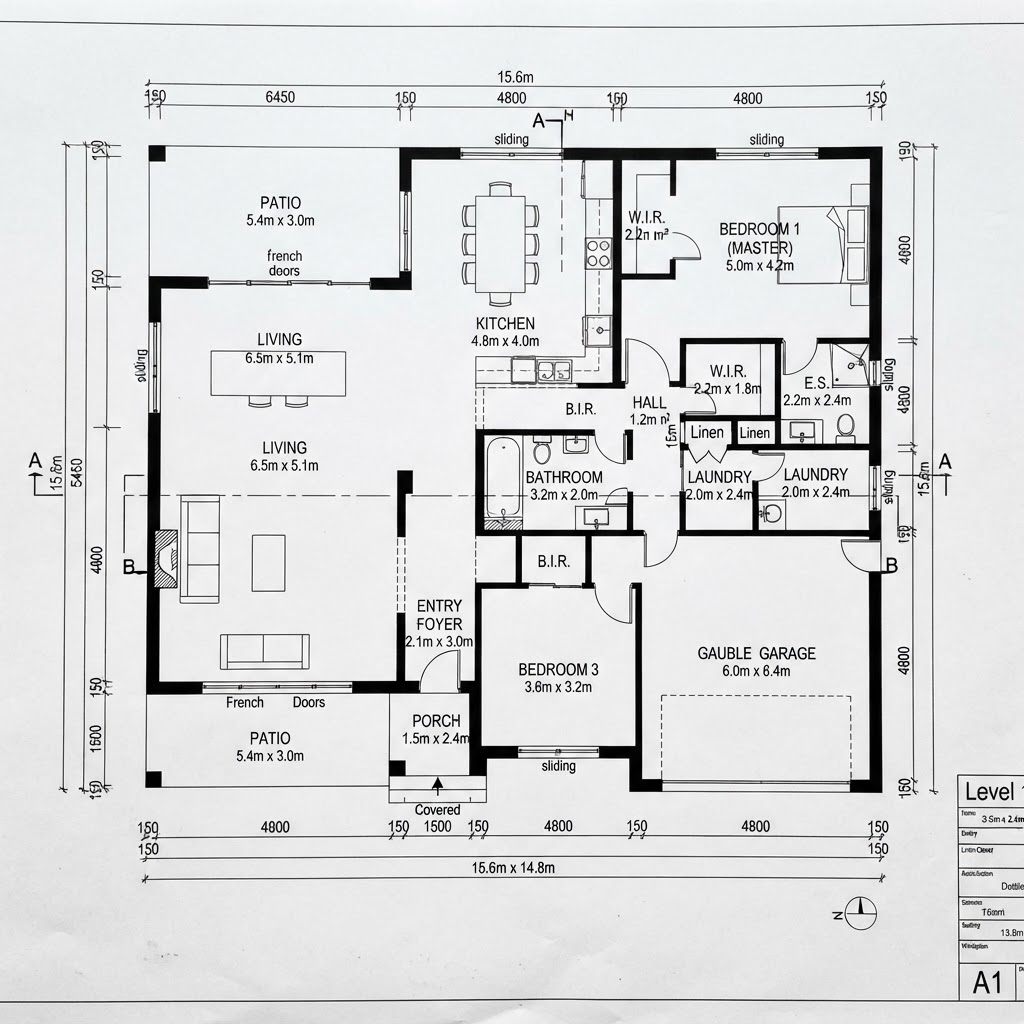
In the 2D plan editor you can generate a plan from a written brief for 1 credit per floor, or import a plan image for AI reading (3 credits) or a DXF. From there it behaves like a CAD tool: walls, doors, windows, dimensions, typed commands, roofs, elevations, sections, quantities, existing/demolish/new phases and design options. It exports DXF, SVG, PDF and IFC, and prints drawing sets at true scale on A1 to A4 sheets at 1:50 or 1:100.
Our honest advice: treat these as sketch-design tools that happen to export clean geometry. Bring the DXF or IFC into Revit, ArchiCAD or your CAD package for development. The AI floor plan generator guide explains the typical errors to look for, such as doors that clash with furniture and stairs without enough headroom.
Test a concept on your next site photo Upload a plot photo, sketch or SketchUp screenshot to the AI Studio and compare several facade options before you model anything. New accounts get 5 free credits, no card needed. Render a concept, 5 free credits
Using AI for client presentations and approvals
Clients decide faster when they can see options side by side and react to them in one place. AI helps twice here: it produces the variations cheaply, and share pages collect the feedback so it doesn't scatter across WhatsApp, email and phone calls.

Clients notice. In the same Houzz 2026 research, 76% of homeowners said AI used by their professional helped them visualize the project and 49% said it made the pro's ideas clearer. Only 31% said it made the pro look more modern, so the value is comprehension, not image.
On ArchHomeAI a project can be shared through a view-only link that hides prompts, plans and account details. Clients can comment on a version, pin a comment to a spot in the image and approve it. You can also ask them to choose between 2 and 8 render versions or 2D design options, and add your office logo and details to share pages and drawing sheets. Set expectations in writing: say the images are AI visualizations and that colors and materials will look different on site.
What do AI tools cost compared with outsourced rendering?
AI concept images cost cents, outsourced renders cost hundreds of dollars, and real-time rendering software costs hundreds to over a thousand a year. They are not interchangeable, so compare the cost of the job you actually need done.
- AI render, standard engine (2 credits): $0.17–0.22
- AI render, Nano Banana Pro (5 credits): about $0.55
- Freelancer, residential exterior (low): $200
- Freelancer, residential exterior (high): $700
- Larger firm, small to medium project (low): $1,000+
ArchHomeAI credit prices on one-time packs (100 credits $11, 500 credits $42); outsourced ranges from Cad Crowd's visualization cost guide. Checked October 2026.
Cad Crowd lists $200 to $700 for a residential exterior from freelancers and smaller firms, and $1,000 to $2,000 per image from larger firms. For in-house work, Lumion Pro is $1,149 a year and D5 Render Pro $360 a year, both with built-in AI features such as upscaling and material generation, plus the hours to model and set up scenes.
Time is the hidden line item. The US Bureau of Labor Statistics puts the median architect's pay at $47.73 an hour in 2025, so one hour spent setting up a throwaway concept view costs more than a few hundred AI variations. That arithmetic is why we'd use AI for options and keep paid renderers for the final marketing image.
The limits of AI in architecture: where it gets things wrong
Image models predict what a building usually looks like; they don't know what yours must be. That produces plausible but wrong details: stairs that go nowhere, windows that shift between views, roofs that couldn't drain, and spans no engineer would sign.

- Consistency: the same house rarely looks identical across four angles. Generating renders by angle from four site photos helps, but check every view.
- Scale: furniture, doors and ceiling heights drift. Never measure from a render.
- Context: the sun can arrive from the north, and neighbors or trees may disappear. Brief the model on orientation and keep the real context.
- Code and structure: nothing in an image model checks setbacks, fire separation or loads.
Skip AI images entirely when a planning committee or a buyer could rely on them as a factual representation, unless they are clearly labeled. RIBA's survey shows the profession shares the unease: 44% of respondents worry AI will let people without professional knowledge design buildings.
AI copyright and ethics for architects
Who owns an AI image, and can anyone copy it? In the US the answer turns on human input: the Copyright Office says purely machine-determined material isn't protected, while your own design expressed through AI can be. Contracts, disclosure and client data need equal care.
In Part 2 of its AI report, published on 29 January 2025, the US Copyright Office concluded that AI outputs are protected only where a human author has determined sufficient expressive elements, and that the mere provision of prompts is not enough. Your drawings, sketches and models used as inputs remain yours. Vendor terms differ: OpenAI's terms, for example, assign output to the user to the extent permitted by law, but that doesn't make an image unique or protectable.
Imitation is the profession's biggest fear: 67% of RIBA respondents worry AI will increase the risk of their work being copied. Practical rules we'd adopt: don't feed another architect's project in as a style reference, get client consent before uploading their plans or photos, tell clients which images are AI-generated, and note in your appointment letter that visualizations are indicative.
A practical AI starter setup for a small practice
Start with one live residential project and one bottleneck, usually early options or client sign-off. Run it end to end for a month, track hours, then decide whether to widen it. The steps below fit a two to ten person office.
- Pick the bottleneck Concept options, plan drafts or approvals. Choose one so you can measure the difference.
- Build a reference kit Five or six images of your own built work and a standard prompt template with materials, light and camera height.
- Generate options from real inputs Use site photos, sketches or a massing model; ask for several variations and change one variable per round.
- Draft and check the plan Start a layout from the brief or an imported plan, then check structure, circulation and code yourself before it reaches the client.
- Present on a share page Upload chosen versions, ask the client to pick between options and collect comments in one place.
- Hand over to your main tools Export DXF or IFC, continue in BIM, and commission or produce final renders once the design is fixed.
For a 3D check of the agreed layout, the 3D planner turns an uploaded plan into a model for 3 credits, with walk-through, 360° panoramas and glTF/OBJ export. The how-to-use guide walks through the Studio screens.
Draft the plan behind the concept Generate a first layout from a written brief (1 credit per floor), refine it with CAD-style tools and export DXF or IFC for your BIM model. Open the 2D plan editor
Frequently asked questions
What are the best AI tools for architects?
It depends on the task. For concept images, photo- and sketch-to-render tools such as the ArchHomeAI Studio are fastest. For final visuals, real-time renderers like Lumion, D5 Render or Enscape now include AI upscaling and material features. For early plans, AI plan generators give drafts you then develop in Revit, ArchiCAD or CAD. Most practices end up combining two or three tools rather than relying on one.
Will AI replace architects?
Not on current evidence. AI produces plausible images and layouts, but it doesn't coordinate structure, services, code and the client's budget, and it can't sign drawings or take professional responsibility. RIBA's 2025 survey found only 18% of UK architects expect AI to cause job losses. The bigger shift is in how time is spent: less on manual visualization, more on design and client work.
Can AI-generated architectural images be copyrighted?
In the US, only partly. The Copyright Office's January 2025 report says outputs are protected where a human determined sufficient expressive elements, and that prompts alone are not enough. Your own sketches, models and designs used as inputs stay protected. Rules differ by country, so check local law and your software's terms before relying on exclusivity.
How much do AI rendering tools cost for architects?
Pay-per-image AI renders are cheap: on ArchHomeAI a standard render is 2 credits, roughly $0.17 to $0.22 on one-time packs, with higher-quality engines at 5 to 7 credits. Subscription real-time renderers cost more but give full control, for example Lumion Pro at $1,149 a year or D5 Render Pro at $360 a year, as listed in October 2026.
Can I submit AI-generated plans for a building permit?
No, not as they come out of the tool. AI plans are early-design drafts that miss structural, services and code coordination. Permit and construction drawings must be prepared or checked and signed by a licensed architect or engineer according to local regulations. Use AI plans to explore layouts, then develop them properly in your CAD or BIM software.
Should architects tell clients they use AI?
Yes. Say which images are AI visualizations, explain that colors, materials and proportions are indicative, and get consent before uploading the client's plans or photos to any service. Houzz's 2026 research suggests clients welcome it: 76% of homeowners said AI used by their pro helped them visualize the project. Transparency also protects you if a client later treats an image as a promise.
Sources
How we wrote this guide: every figure comes from the sources listed at the end and was checked in September 2026. Prices vary by city, specification and year.
- Second RIBA AI Report shows surge in usage among UK architects — Royal Institute of British Architects
- 12 Key Takeaways on AI in Home Design and Construction — Houzz
- Copyright Office Releases Part 2 of Artificial Intelligence Report — U.S. Copyright Office
- Terms of Use — OpenAI
- Architects: Occupational Outlook Handbook — U.S. Bureau of Labor Statistics
- What are Architectural 3D Visualization Costs, Service Fees & Rates for Companies? — Cad Crowd
- Lumion plans and pricing — Lumion
- Render Pricing in 2026: D5 Plans, Costs & Is It Worth It? — D5 Render